Configuration
REX and M2EX include a number of extra configuration options compared with the vanilla games.
Main Menu Options
Section titled “Main Menu Options”Graphics Settings
Section titled “Graphics Settings”New options are available in the graphics options menu for some graphics settings (highlighted red in M2EX). For example the “Extreme” settings.
These push the graphical detail far beyond what the games were capable of before, but can come at a significant cost to performance. You can test these out and see what your PC can handle.
Extended Options
Section titled “Extended Options”Options > Extended Settings on the main menu opens Extended Options, which holds REX/M2EX’s own choices. Some of them can also be changed while playing, under Extended Settings in the in-game options menu.
| Option | What it does | Where you can change it |
|---|---|---|
| Campaign Terrain | Classic (the original look) or Enhanced (new ground art and tile models with PBR, plus new coastlines). | Main menu and campaign map. |
| Battle Terrain | The original or the high-detail battle ground. Applies from the next battle. | Main menu and campaign map. |
| Grass Coverage (REX) | The original or the new battle grass. | Main menu and battles, also in multiplayer. |
| Battle Water | The original or the modern battle water. | Main menu and campaign map. |
| Interface | Classic or HD interface. Applies at once. | Everywhere, also in multiplayer. |
| Army Size | 20 units everywhere, 20 / 40 (20 on the campaign, up to 40 in a large battle) or 40 everywhere. | Main menu only. Multiplayer games pick their army size when hosting. |
M2EX ships only the Classic Campaign Terrain and Battle Terrain for now. Options that aren’t available in a place aren’t shown there. A mod can lock options to its own choice; they then show greyed out, and if it locks all of them the Extended Settings button is greyed out too.
Modders can add their own terrain sets and other configurations, see Campaign terrain and descr_toggles_ex.txt.
Modern WASD Control Scheme
Section titled “Modern WASD Control Scheme”In Options > Keyboard Settings, click the right arrow to change from “Total War Style Setup” to “FPS Style Setup”.
In-game options
Section titled “In-game options”While playing, you will find a number of new gameplay and graphical configuration options.
Unit Movement Run Mode
Section titled “Unit Movement Run Mode”While playing, go to Options > Game Options.
This controls whether units walk (as in vanilla) or run. By default, this is set so they run when you drag out a formation.
New Camera and Tilt Options
Section titled “New Camera and Tilt Options”While playing, go to Options > Camera Options.
By default, the Camera Mode is set to RTS Camera, which is REX/M2EX’s much improved camera.
Enable No Camera Tilt if you want to disable tilting when you zoom in and out.
Unit cards and icons on highlight
Section titled “Unit cards and icons on highlight”While playing, go to Options > Video Options.
These two options determine if you see little icons and unit cards when you hold the highlight key (this defaults to space bar).
Unit Silhouettes
Section titled “Unit Silhouettes”While playing, go to Options > Video Options.
This controls whether blue/red silhouettes of friendly and enemy units appear through obstacles, such as trees or terrain, enhancing visibility.
Range Indicator
Section titled “Range Indicator”While playing, go to Options > Video Options.
This controls whether a range circle is drawn around selected ranged units, showing how far they can shoot (depending on terrain etc).
This indicator can be customised further in the Advanced Configuration Files
Blood Pools
Section titled “Blood Pools”While playing, go to Options > Video Options.
This controls whether pools of blood are created around dead soldiers.
Advanced Configuration Files
Section titled “Advanced Configuration Files”Certain options are not currently available to tweak within the game. These can be found in text files in the data folder, such as: descr_ex.txt and descr_caps_ex.txt.
Note that these files will be overwritten every time you install a new release, so it’s recommended to keep a note/backup of the values you changed and re-add them after upgrading to a new version.
Certain especially useful options are noted below (but the files have comments to explain each setting and what it does):
descr_ex
Section titled “descr_ex”This section allows you to customise the look of the range indicators:
;;;;;;;;;;;;;;;;;;;;;;;;;;;;;;;;;;;;;;;;;;;;;;;;;;;;;; Battle range indicator;;;;;;;;;;;;;;;;;;;;;;;;;;;;;;;;;;;;;;;;;;;;;;;;;;;;;A more subtle red range indicator configuration (closer to other Total War games) would be:
; Disc colour, r g b (0-255)range_indicator_colour 255 0 0
; Alpha at the edge (0-1)range_indicator_peak_alpha 1
; Alpha of the inside (0-1)range_indicator_floor_alpha 0
; Inward fade width from the edge as a fraction of the radius (0-1)range_indicator_falloff 0.015
; Outer-edge softness; small = crisp (0-1)range_indicator_fuzz 0.008
blood_pool_limit allows you to set maximum blood pools on the battlefield.
corpse_limit allows you to set how many corpses are allowed before the oldest ones are removed for performance reasons.
show_unit_card_always allows you to set unit cards and icons to appear at all times (and there are other options next to it allowing further customisation).
The hd_terrain settings (REX) control the high-detail battle terrain: how often the ground textures repeat up close and far away, how ground types blend, and how strong their normal maps are. See HD terrain.
Settlement panel layout
Section titled “Settlement panel layout”In 20-unit games, these descr_ex settings control the classic campaign settlement panel: the building grid on the construction tab, the unit grid on the recruitment tab, and their queues. 40-unit games keep their own fixed layout.
| Setting | Values | Default | What it does |
|---|---|---|---|
settlement_buildings_per_row |
1-16 | 6 | Building cards per row on the construction tab. |
settlement_units_per_row |
1-16 | 9 | Unit cards per row on the recruitment tab. |
settlement_card_rows |
1-6 | 2 | Rows of cards both tabs show before you need to scroll. |
The game sizes the cards so the rows fill the panel: more cards per row or more rows make them smaller. The same card sizes are used in other campaign panels showing these cards. The defaults are the original game’s layout.
- REX: cards never grow past their original size.
9,10and3match the 40-unit layout. - M2EX: the queues hold one row’s worth of cards, at least the original 6 buildings and 9 units and at most 9 and 11.
9,11and3match the 40-unit layout.
For example, to see more buildings and units at once in a 20-unit game:
settlement_buildings_per_row 9settlement_units_per_row 11settlement_card_rows 3Bodies in the water
Section titled “Bodies in the water”These descr_ex settings control what happens to men and mounts that die in the water, for example soldiers who drown or fall overboard:
| Setting | Values | Default | What it does |
|---|---|---|---|
water_corpses |
spin, float, sink |
sink |
spin: the body turns round and round on the surface (the original behaviour). float: it lies on the surface in its last pose, gently rocking. sink: it floats for a while, then slowly sinks to the bed. |
water_corpse_sink_delay |
0-600 | 8 | Seconds a body floats before it starts to sink. |
water_corpse_sink_speed |
0.01-10 | 0.25 | Metres per second it sinks at. |
water_corpse_drift |
0-4 | 0.5 | Share of the water’s speed a body drifts at. 1 = it drifts along with the waves and down rivers, 0 = it stays where it died. Bodies that drift close to a shore wash up on it. |
water_death_anim_swell |
true, false |
true |
true: the dying body rides the waves like the living swimmers. false: the death animation plays held at the spot on the waves where the swimmer died, then the body eases onto the moving waves. |
With the modern battle water (water_ex true), floating bodies move with the waves just like living swimmers. The death animation always plays out in full before the body starts spinning, floating or sinking.
For example, to keep bodies on the surface for the whole battle:
water_corpses floatIn multiplayer, all players must use the same water_corpses, water_corpse_sink_delay, water_corpse_sink_speed and water_corpse_drift values. In M2EX
descr_water_ex
Section titled “descr_water_ex”descr_water_ex.txt configures the modern battle water. To use it, set water_ex true in descr_ex.txt (the default) and restart the game; water_ex false brings back the original water. Every setting is explained at the top of the file and in the descr_water_ex.txt guide. Two of them are especially useful for weather:
weather_transition (0-3600, default 0 = at once) sets how many seconds of battle time the water takes to fade into the new weather’s look when the weather changes during a battle. Colours, waves and foam blend smoothly, and the fade pauses when the battle is paused. A weather block can set its own value. The shipped files use 30 seconds.
tint_brightness and tint_saturation (0-4, default 1) scale the brightness and saturation of the water colours (shallow_color, deep_color and scatter_color). A saturation of 0 makes the water grey. They are meant for weather blocks: the tint goes on top of whatever colours the climate and ground type set, and fades with weather_transition.
The shipped files make the water darker and greyer as the wind picks up:
| Weather (REX) | Weather (M2EX) | tint_brightness |
tint_saturation |
|---|---|---|---|
rain_summer_shower, rain_drizzle |
cloudy, cloudy_arid, cloudy_winter |
0.9 | 0.85 |
rain_storm, hail_shower, snow_falling, dust_storm |
rain, snow, dusty |
0.8 | 0.7 |
blizzard, jeffs_brain |
storm, blizzard |
0.7 | 0.6 |
To keep the water the same colour in every weather, set both values to 1 (or remove the lines).
descr_water_effects_ex
Section titled “descr_water_effects_ex”descr_water_effects_ex.txt controls how the modern battle water reacts to what happens in it: ripples and foam trails behind soldiers, horses, elephants and swimmers, ripples from bodies and missiles, and rain splashing on the water with a small ripple per drop. It’s reloaded as soon as you save it. See descr_water_effects_ex.txt for every setting.
For example, to turn the foam trails off but keep the ripples, set this in its settings block:
definition foam_trails{ default { enabled false }}descr_caps_ex
Section titled “descr_caps_ex”fog_of_war_shroud - Allows you to change whether fog of war for unexplored areas in REX is black or vanilla (grey, as in the original game).
faction_unlock - Allows you to change whether all factions are unlocked for the campaign straight away or whether you want to return to the vanilla unlocking mechanics.
descr_sm_factions
Section titled “descr_sm_factions”You can use this file to add internal province borders on the campaign mini-map, by adding a tertiary_colour to each faction.
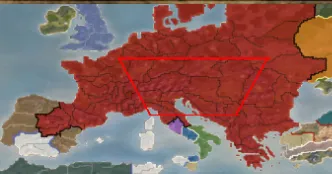
For example:
tertiary_colour red 0, green 0, blue 0Visibility of arrows
Section titled “Visibility of arrows”REX/M2EX makes arrows brighter than they are in vanilla by default.
descr_projectile_new.txt (REX) and descr_flaming_projectiles.txt (M2EX) allow you to customise this.
An example from the REX file for the parameters:
;<far> <mid> <length_cap> <whiten_cap> <whiten_gain>distance_visibility 0.05 0.10 2.0 0.19 0.0007If you would like to revert the look back to vanilla, set the “distance_visibility” lines in the files to:
distance_visibility 0 0 1 0 0